
Dreamiverse Frequently Asked Questions
How do I enter a new Entry ( Aka: a Dream/Vision/Experience or NDE or Déjà vu )?
After logging in, simply click the link in the bottom navigation bar called 'Create Entry'
Where do I find my own and other users Entries?
Click the /entries link in the bottom navigation menu on the site. You can click the 'Show Search Filters' button for all sorts of options to refine your searches.
Another way to discover new Entries is via your Dream Stream ( also linked in the bottom nav menu ); so find the latest Entries by your friends and people you follow.
What type of Entries can I create?
Dreamiverse supports seven distinct Entry types — each one a different window into our perception. Choose the type that best fits your experience when creating a new Entry.
🌙 Dream
The most universal of night-time visitors — your sleeping mind's journeys, adventures, and stories. A Dream is the raw canvas your subconscious paints while you rest.
✨ Vision
A waking, hypnagogic, or meditative image or revelation that either arrives or is invoked with a strong sense of symbolic meaning or significance.
🌀 Déjà Vu
The sensation that a moment you are living has somehow already been lived. A Déjà Vu entry captures these fleeting, mysterious slips in your personal timeline. A Glitch in the Matrix?
🌟 Experience
A broad category for extraordinary events that don't fit neatly elsewhere — Waking Life moments, synchronicities, out-of-body moments, or other remarkable real-world encounters worth preserving.
💫 N.D.E. — Near-Death Experience
For the profound threshold events reported at the edge of death — tunnels of light, life reviews, encounters with deceased Loved ones, and the transformed sense of existence that follows.
🛸 U.F.O. / U.S.O. / U.A.P. / Orb — Unidentified Flying Object / Unidentified Submerged Object / Unidentified Anomalous Phenomenon / Orb
For encounters with unexplained aerial, submerged, or luminous phenomena — craft, lights, or presences fin the sky or water that defy any conventional explanation you can find.
👁️ Entity / Angel
For encounters with non-human intelligences — beings of light, shadow figures, interdimensional presences, or Angelic visitors that made direct contact and left a lasting impression on your reality.
How do I add custom images to my Entry?
Open the entry you own and click the Edit button to enter Edit Mode. Hover over the header image area — two buttons will appear: Upload Header Image and Delete.
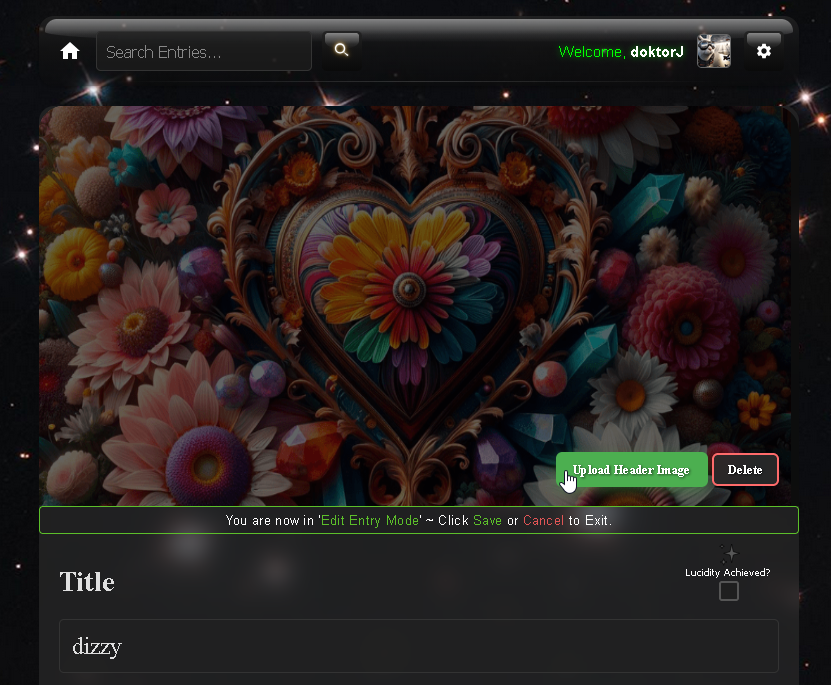
Once you select the Upload Header Image button, select your desired image, then you'll be given the option to zoom in/out to determine the final cropped position. Then click Save Header and you're done! The previous header is automatically replaced.
- Accepted formats: JPEG, PNG, WebP, GIF
- Max file size: 10 MB
- Output size: 1200 × 400 px (3:1 ratio)
How do I change my Avatar Image
Click the 'Gear' icon in top Navgation menu and select 'Profile'. Then click 'Upload Avatar'
How do I update my Account Details, Password, or Email Notification Preferences?
Once logged in, click the Gear icon in the top navigation and select Profile. From there you can manage all of the following:
- Avatar — Upload or change your profile picture (cropped to a square)
- Profile Header Image — Upload a wide banner image displayed at the top of your public profile
- Bio — Write a short description about yourself that appears on your public profile page
- Location — Optionally set your country, region, and city (used for the global user map)
- Email Address — Change the email address associated with your account
- Password — Update your password at any time
- Email Notification Preferences — Choose which activity triggers an email notification (new loves, comments, replies, follows, friend connections, and new entries from people you follow or are friends with). You can also unsubscribe from all Dreamiverse emails in one click from this section, and re-subscribe at any time.
What is the Dream Stream, Followers & Friends?
When you look at entries you should see a 'Follow' benath the entry owners Avatar. If click it ( to follow this user ); then their latest entries will show up in your Dream Stream.
If you are already following a user and they follow you back ( or vice-versa ), you automatically become friends ( which you can filter by on your Dream Stream.
Do you sell or share my Entry data?
Your private Entries are only viewable by you. Your public Entries are open on this site; however we do not ( and will never ) sell your Entry or personal data on this site.
How does this site make $money?
We very intentionally do not. We also don't sell our data or pollute your Dreams with advertising. Donations towards the hosting costs are welcome ( just hit up our Feedback form; but generally speaking you should consider the evolution of this site, and it's current state, as a gift to the world. Enjoy it!
 Dreamiverse Version: 0.1.1-beta (
  Early Access Beta )